
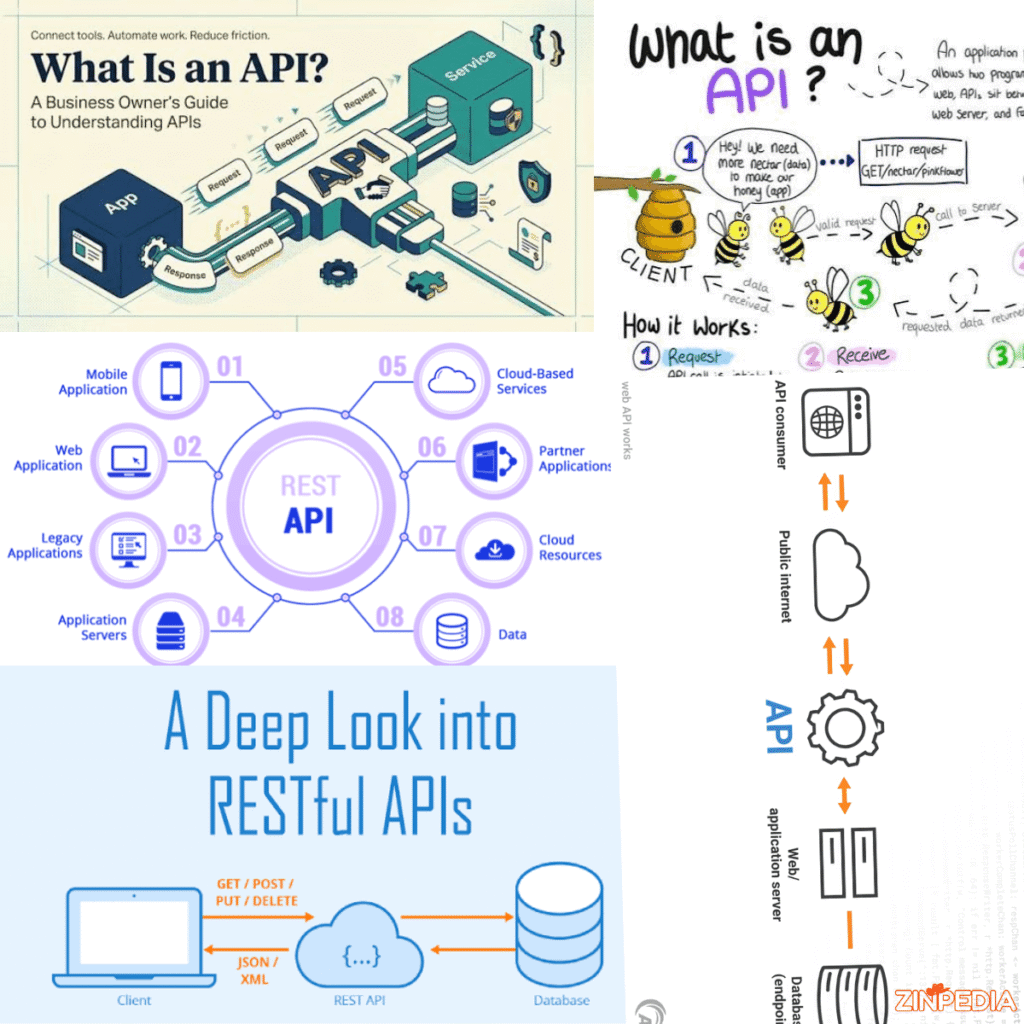
You use APIs almost every day, even if you have never heard the term before.
When a weather app shows the latest forecast, a food delivery app displays a restaurant menu, or a travel website compares hotel prices, an API is often working in the background.
APIs allow different software systems to communicate with one another. Instead of every application building every feature from the beginning, developers can use APIs to connect existing services, request information, and perform specific actions.
That may sound technical, but the basic idea is simple.
An API is like a messenger between two pieces of software.
One system sends a request, the API delivers that request to another system, and then it returns the response.
In this guide, you will learn what an API is. working of API?, uses of APIs for businesses, the main types of APIs, and what beginners should understand before working with one.
What Is an API in Simple Words?
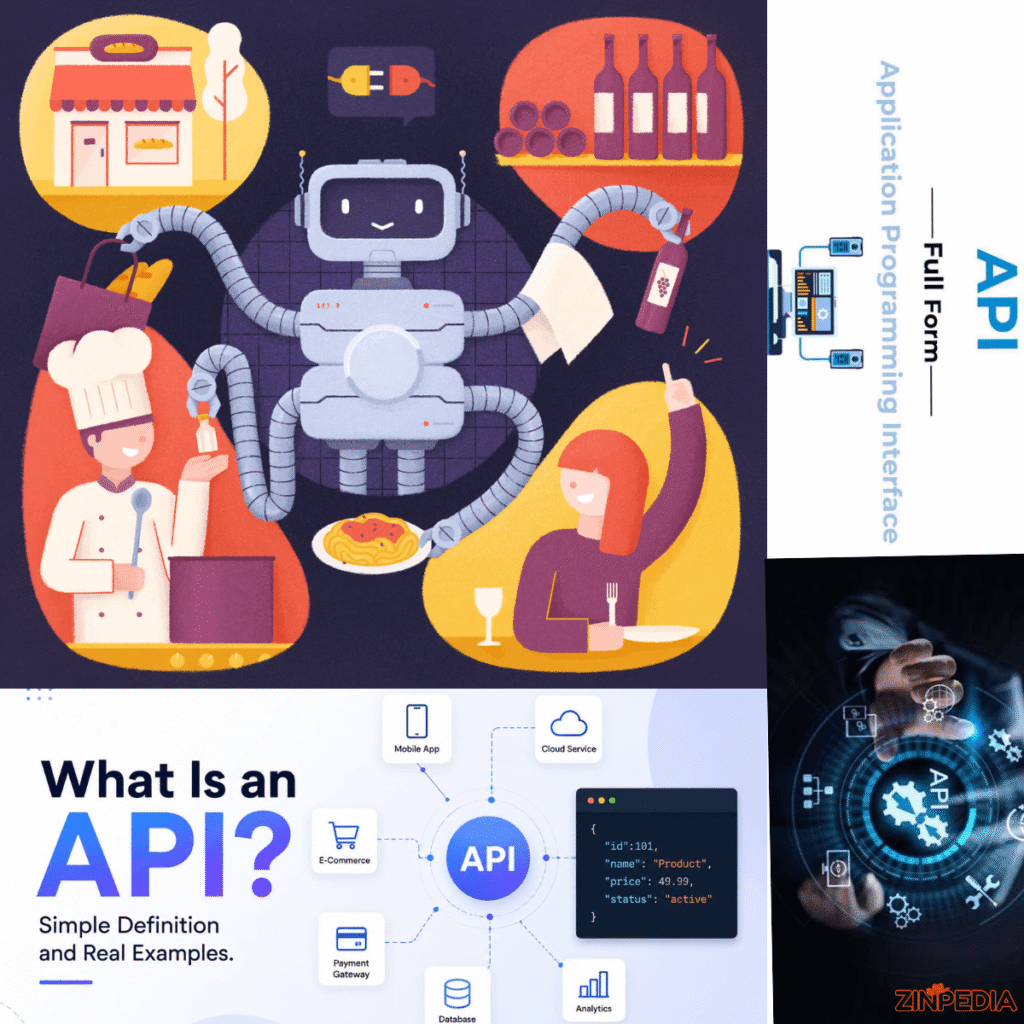
API stands for Application Programming Interface.
An API is a collection of protocols enabling one software application or service to interact with another.
It defines:
- What information can be requested
- How the request should be sent
- What actions are allowed
- How the response will be returned
- What security rules must be followed
You can think of an API as a controlled doorway into a software system.
The API does not normally give an outside application full access to the internal system. Instead, it provides specific options that developers can use safely.
For example, a weather service may allow an application to request:
- Current temperature
- Rain probability
- Wind speed
- Hourly forecast
- Seven-day forecast
The application sends a request containing a location. The weather API processes that request and returns the requested data.
The application then displays the information in a user-friendly way.
A Simple Restaurant Example
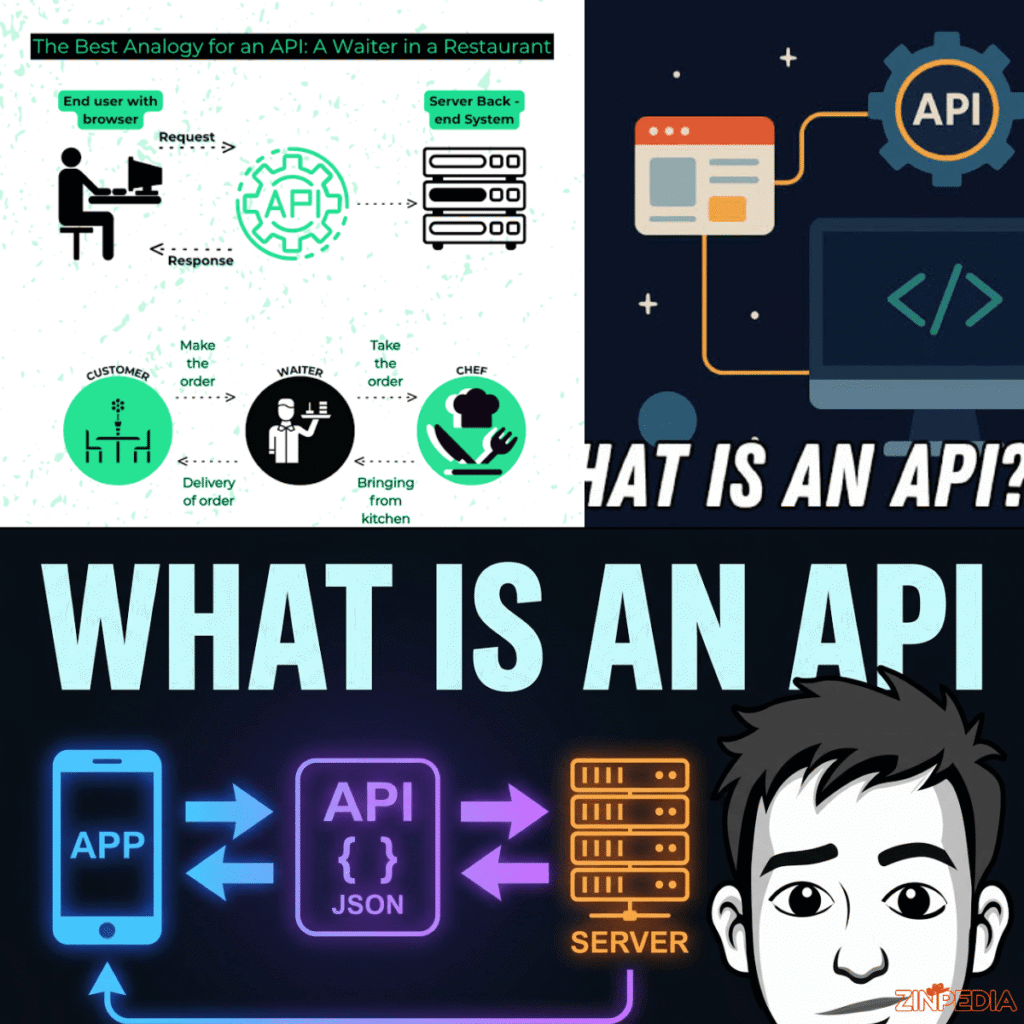
A restaurant provides an easy way to understand how APIs work.
Imagine the following:
- You are the user
- The menu is the list of available API options
- The waiter is the API
- The kitchen is the server or internal system
You choose something from the menu and tell the waiter.
The waiter carries your order away to the kitchen. The kitchen makes your dish, and the waiter brings you back the result.
You do not need to enter the kitchen, understand its equipment, or know how the meal is prepared.
In the same way, an application can use an API without knowing every detail of the system behind it.
The API provides a clear and controlled method for requesting a result.
How Does an API Work?
Most APIs work through a request-and-response process.
One application, usually called the client, sends a request to another system, usually called the server.
The server receives the request, processes it, and returns a response.
A basic API interaction usually includes the following steps.
Step 1: The User Takes an Action
The process often begins when a person acts as an application.
For example, the user may:
- Search for a city’s weather
- Sign in with a Google account
- Check delivery charges
- Make an online payment
- Search for a hotel room
- View a map location
The application needs information or a service from another system to complete the action.
Step 2: The Application Sends an API Request
The application sends a request to a specific API address.
This address is commonly called an endpoint.
An endpoint represents a particular type of information or action.
For example:
- One endpoint may provide current weather
- Another may provide historical weather
- Another may provide user account details
- Another may create a new payment
The request may also contain additional information, such as:
- A city name
- A product ID
- A customer number
- A date
- A search term
- Login credentials
Step 3: The Server Processes the Request
The server checks the request and decides what to do.
It may:
- Search a database
- Calculate a result
- Confirm the user’s identity
- Check whether permission has been granted
- Contact another service
- Save new information
The server also checks whether the request follows the API’s rules.
Step 4: The API Returns a Response
After processing the request, the server sends a response back to the application.
The response may contain:
- Requested data
- A confirmation message
- An error message
- A status code
- Additional instructions
The application then converts the response into something useful for the user.
For example, raw weather data may be displayed as a temperature card, rain icon, or forecast chart.
A Basic API Example
Imagine a travel application requesting hotel information.
The request may ask for:
- Hotels in London
- Check-in date
- Check-out date
- Number of guests
- Maximum price
The API may return:
- Hotel names
- Room prices
- Ratings
- Availability
- Images
- Location details
The travel application organizes this data and displays it as a list of available hotels.
Without the API, the application would need to collect and update all that information independently.
Real-World Examples of APIs
APIs are used across almost every major digital industry.
They help applications share information and add useful features without rebuilding complete systems.
Weather Applications
Weather applications often receive forecasts from weather-data providers through APIs.
The application sends a location and receives information such as:
- Temperature
- Humidity
- Wind
- Rain probability
- Weather warnings
The app then presents this data in a simple visual format.
Online Payments
E-commerce websites use payment APIs to process transactions.
When a customer enters payment information, the store communicates with a payment service.
The payment API may:
- Confirm the payment details
- Check whether funds are available
- Approve or reject the transaction
- Return a payment confirmation
- Support refunds
The online store does not need to build an entire banking network.
It connects with a payment provider through an API.
Maps and Location Services
Delivery apps, taxi services, property websites, and travel platforms use mapping APIs.
These APIs can provide:
- Maps
- Directions
- Travel distance
- Estimated arrival time
- Traffic information
- Nearby locations
- Address suggestions
A delivery application can use a mapping API to calculate the route between a restaurant and a customer.
Social Media Login
Many websites allow users to sign in using an existing Google, Apple, Facebook, or Microsoft account.
An authentication API helps the website confirm the user’s identity without requiring a completely separate account system.
The user gives permission, and the selected service shares approved account information with the website.
Travel Booking
Travel websites use APIs to collect information from airlines, hotels, rental-car companies, and booking systems.
This allows users to compare several options from one platform.
An API may return:
- Ticket prices
- Flight schedules
- Seat availability
- Hotel rooms
- Cancellation conditions
- Booking confirmation
Online Shopping
Retail websites use APIs for many purposes, including:
- Product search
- Inventory checking
- Shipping calculations
- Payment processing
- Order tracking
- Customer reviews
- Currency conversion
When a customer tracks a package, the store may request the latest delivery status from a courier’s API.
Artificial Intelligence Tools
Many websites and business systems connect with artificial intelligence models through APIs.
An AI API may help an application:
- Generate text
- Summarize documents
- Analyze images
- Translate languages
- Answer customer questions
- Classify information
- Create speech from text
The application sends instructions and data to the AI service, then receives a generated result.
What Are the Main Types of APIs?
APIs can be grouped in different ways.
Some are classified by who can access them, while others are classified by the technology or communication style they use.
Public APIs
A public API is available to outside developers.
It may be free, paid, or limited to a certain number of requests.
Companies offer public APIs to encourage developers to build new applications using their data or services.
Public APIs may provide access to:
- Weather data
- Maps
- News
- Financial information
- Sports results
- Public records
Public does not always mean completely unrestricted. Developers may still need to create an account and receive an API key.
Private APIs
A private API is used inside an organization.
It helps internal systems communicate with each other.
For example, a company may use a private API to connect:
- Its website
- Customer database
- Inventory system
- Accounting software
- Mobile application
- Employee dashboard
Private APIs are normally not available to the general public.
Partner APIs
Partner APIs are shared with approved business partners.
Access is controlled through contracts, accounts, or special permissions.
For example, a hotel company may provide a partner API to selected travel-booking websites.
The booking website can then check rooms, prices, and availability.
REST APIs
REST is one of the most common approaches used for web APIs.
A REST API normally uses standard web methods to perform actions.
Common methods include:
- GET: Retrieve information
- POST: Create new information
- PUT: Replace existing information
- PATCH: Update part of existing information
- DELETE: Remove information
For example:
- GET may retrieve a customer profile
- POST may create a new order
- PATCH may update an address
- DELETE may remove a saved item
REST APIs commonly return information in JSON format because it is lightweight and easy for applications to process.
SOAP APIs
SOAP is a more structured communication method.
It uses strict rules and normally sends information in XML format.
SOAP APIs are often found in older enterprise systems and industries that require formal messaging standards.
They may be used in:
- Banking
- Government systems
- Insurance
- Large corporate platforms
SOAP can provide strong structure and built-in standards, but it is often more complex than REST.
GraphQL APIs
GraphQL allows the client to request exactly the information it needs.
Instead of receiving a large fixed response, the application can select specific fields.
For example, a product application may request only:
- Product name
- Price
- Main image
It does not need to receive every product detail.
This can reduce unnecessary data transfer and give developers more control over responses.
Webhooks
A webhook is slightly different from a standard API request.
With a normal API, an application asks whether something has happened.
With a webhook, the other system sends a message automatically when an event occurs.
For example, a payment service may send a webhook when:
- A payment succeeds
- A payment fails
- A refund is completed
- A subscription is cancelled
This allows applications to receive updates quickly without repeatedly requesting the same information.
Why Are APIs Important?
APIs make modern software development faster, more flexible, and more connected.
Without APIs, many popular digital services would be much harder to build.
Faster Development
Developers do not need to create every feature from the beginning.
They can connect trusted services for:
- Payments
- Maps
- Email delivery
- User login
- Data storage
- Weather
- Artificial intelligence
This can reduce development time and allow teams to focus on the main purpose of their product.
Better User Experience
APIs make it possible to combine several services into one smooth experience.
For example, a food delivery app may use separate APIs for:
- Restaurant menus
- Online payment
- Maps
- Driver location
- Text-message notifications
The user sees one application, even though several systems are working behind it.
Easier Automation
APIs allow businesses to automate repeated tasks.
A company may use an API to:
- Add new customers to a mailing list
- Create invoices
- Update inventory
- Send order confirmations
- Track deliveries
- Move information between platforms
Automation can reduce manual work and lower the risk of data-entry mistakes.
Reliable Data Sharing
APIs provide a consistent method for systems to exchange information.
Instead of copying data manually between different applications, businesses can connect them directly.
This helps keep information updated across several platforms.
Business Growth
APIs can create new business opportunities.
A company may allow partners to use its services, sell API access, or build an ecosystem around its platform.
For example, a payment company can grow by allowing thousands of online stores to integrate its payment API.
API Security and Access Control
APIs can provide access to important information and actions, so security is a major concern.
A poorly protected API may expose customer data, business records, or account functions.
Developers use several methods to control API access.
API Keys
An API key is a string of characters used to authenticate an app or developer.
The key may be included with every request.
It helps the API provider:
- Identify the user
- Track usage
- Apply request limits
- Block unauthorized access
- Charge for usage
API keys should not be publicly exposed.
Authentication Tokens
A token can confirm that a user or application has permission to access a service.
Tokens are commonly used after login and may expire after a certain period.
This is generally safer than repeatedly sending a password.
Permissions
An API should provide only the access required for a specific task.
For example, an application may be allowed to read a user’s calendar but not delete events.
Limiting permissions reduces risk.
Rate Limits
A limit defines how many requests can happen over a period of time.
For example, an API may allow:
- 100 requests per minute
- 10,000 requests per month
- A limited number of free requests
Rate limits help prevent abuse and protect the service from excessive traffic.
Secure Connections
APIs should normally use HTTPS to protect information while it travels between systems.
Sensitive information should not be sent through an unprotected connection.
Error Handling
Applications should handle API errors safely.
They should not expose private server details, passwords, database information, or secret keys in error messages.
What Is an API Endpoint?
An endpoint is a specific location where an API receives a request.
You can think of it as one address inside the API.
Different endpoints handle different tasks.
For example, an online store API may include endpoints for:
- Products
- Customers
- Orders
- Payments
- Shipping
A product endpoint may retrieve a list of products.
An order endpoint may create a new order or check an existing order.
The structure may look like this:
example.com/api/products
The exact format depends on the API.
An endpoint often accepts additional information through:
- The URL
- Query parameters
- Request headers
- Request body
Developers use API documentation to learn which endpoint to use and what information must be included.
What Is API Documentation?
API documentation is a guide explaining how developers can use an API.
Good documentation normally includes:
- Available endpoints
- Required authentication
- Request examples
- Response examples
- Error codes
- Usage limits
- Supported methods
- Data formats
- Security instructions
Without clear documentation, an API can be difficult to understand even when it is technically powerful.
Before choosing an API, developers should review whether its documentation is complete, accurate, and regularly updated.
They should also check:
- Reliability
- Pricing
- Support
- Usage limits
- Privacy rules
- Data quality
- Version policy
Common API Terms Beginners Should Know
Several technical words appear frequently when learning about APIs.
Request
A request is the message sent to an API.
It tells the API what information or action is needed.
Response
A response is the information returned by the API.
It may contain data, confirmation, or an error.
JSON
JSON is a common format used to organize and exchange data.
It is easy for software systems to read and is widely used by REST APIs.
HTTP Method
An HTTP method describes the type of action being requested.
Common methods include GET, POST, PUT, PATCH, and DELETE.
Status Code
A status code tells the application what happened.
Common examples include:
- 200: The request was successful
- 201: New information was created
- 400: The request was incorrect
- 401: Authentication is required
- 403: Access is not allowed
- 404: The requested resource was not found
- 500: The server experienced an error
API Key
An API key identifies the application using the API.
Authentication
Authentication confirms the identity of a user or application.
Rate Limit
A rate limit controls how frequently the API can be used.
Integration
An integration is a connection between two or more software systems.
Frequently Asked Questions
What does API stand for?
API = Application Programming Interface. It is a set of guidelines that allows various software programs to communicate with one another.
What is an API in simple language?
An API is a messenger between software systems. One application sends a request, and the API returns information or completes an action.
What is an example of an API?
A weather application may use a weather API to request the current temperature for a city. The API returns the data, and the application displays it to the user.
Is an API a program?
An API is not usually a complete program by itself. It is an interface that allows one program to interact with another service or system.
Do developers only use APIs?
Developers create and connect APIs, but ordinary users benefit from them every day through websites, mobile apps, payment systems, maps, and online services.
Is an API the same as a website?
No. A website is designed mainly for people to view and interact with. An API is designed mainly for software systems to exchange data or perform actions.
What is a REST API?
One of the most common types of web API is a REST API, which uses standard web methods like GET, POST, PUT, PATCH, and DELETE.
What is an API key?
An API key is a unique code that identifies the application or developer making a request. It may also be used to track usage and apply limits.
Are APIs free?
Some APIs are free, while others require payment. Many providers offer a limited free plan and charge for additional usage.
Can an API be hacked?
Any poorly secured digital system can be attacked. API providers reduce risk through authentication, permissions, encryption, rate limits, monitoring, and secure coding.
What happens when an API is unavailable?
The connected feature may stop working temporarily. A well-designed application should show a clear error message, retry safely, or provide an alternative.
What is API integration?
API integration means connecting two or more software systems so they can exchange information or perform actions automatically.
Do APIs store data?
An API normally provides access to data or services. The data itself may be stored in a database, cloud platform, or another internal system.
What is the difference between an API and a database?
A database stores information. An API provides a controlled way for applications to request, add, update, or remove that information.
Can a beginner learn APIs?
Yes. Beginners can start by understanding requests, responses, endpoints, JSON, and basic HTTP methods. Many public APIs provide simple examples for practice.
Final Thoughts
An API is a bridge between different software systems.
It allows one application to request data, use a service, or perform an action through a defined set of rules.
APIs work behind many everyday digital experiences, including online payments, maps, weather apps, travel booking, social login, package tracking, and artificial intelligence tools.
The basic process is simple:
- An application sends a request
- The API delivers the request to a server
- The server processes it
- The API returns a response
For developers, APIs reduce development time and make integrations easier. For businesses, they improve automation, data sharing, customer experience, and growth opportunities.
For ordinary users, APIs mostly remain invisible. However, they are one of the main reasons modern applications can connect so many useful services in one place.
Once you understand requests, responses, endpoints, authentication, and data formats, the idea of an API becomes much easier to understand.
Explore More Helpful Articles– Visit Now